
在网站建设中,h1-h6标签不仅是页面结构的核心,更是百度SEO优化的关键要素——合理使用h标签能清晰划分页面层级,帮助搜索引擎快速抓取核心内容,提升页面收录效率;而美观的h标签样式,能增强用户阅读体验,降低跳出率,进一步反向促进SEO排名提升。本文整理了一套通用、易修改、适配多场景的h1-h6标签美化代码,兼顾颜值与SEO,新手也能直接复制使用,助力网站快速被百度收录。
一、先搞懂:h1-h6标签的SEO核心逻辑(收录关键)
很多站长容易忽视h标签的SEO价值,甚至随意使用或不使用,导致页面结构混乱,搜索引擎无法识别核心内容,影响收录。这里先明确3个核心要点,避免美化的同时踩SEO坑:
-
层级清晰:一个页面仅保留1个h1标签(对应页面核心主题,如文章标题、网站首页标题),h2标签对应二级栏目/核心分点,h3-h6依次递减,不可跳过层级(如直接从h1跳到h3),否则会打乱搜索引擎抓取逻辑。
-
关键词布局:h1标签需自然融入页面核心关键词(如本文h1融入“h1-h6标签美化代码”“百度SEO收录”),h2-h3可融入长尾关键词,避免关键词堆砌,保持语句通顺。
-
样式统一:美化后的h标签需保持视觉一致性,字体、颜色、间距适配网站整体风格,既提升用户体验,也让搜索引擎认为页面排版规范、质量较高,间接提升收录优先级。
二、通用h1-h6标签美化代码(适配所有网站,直接复制可用)
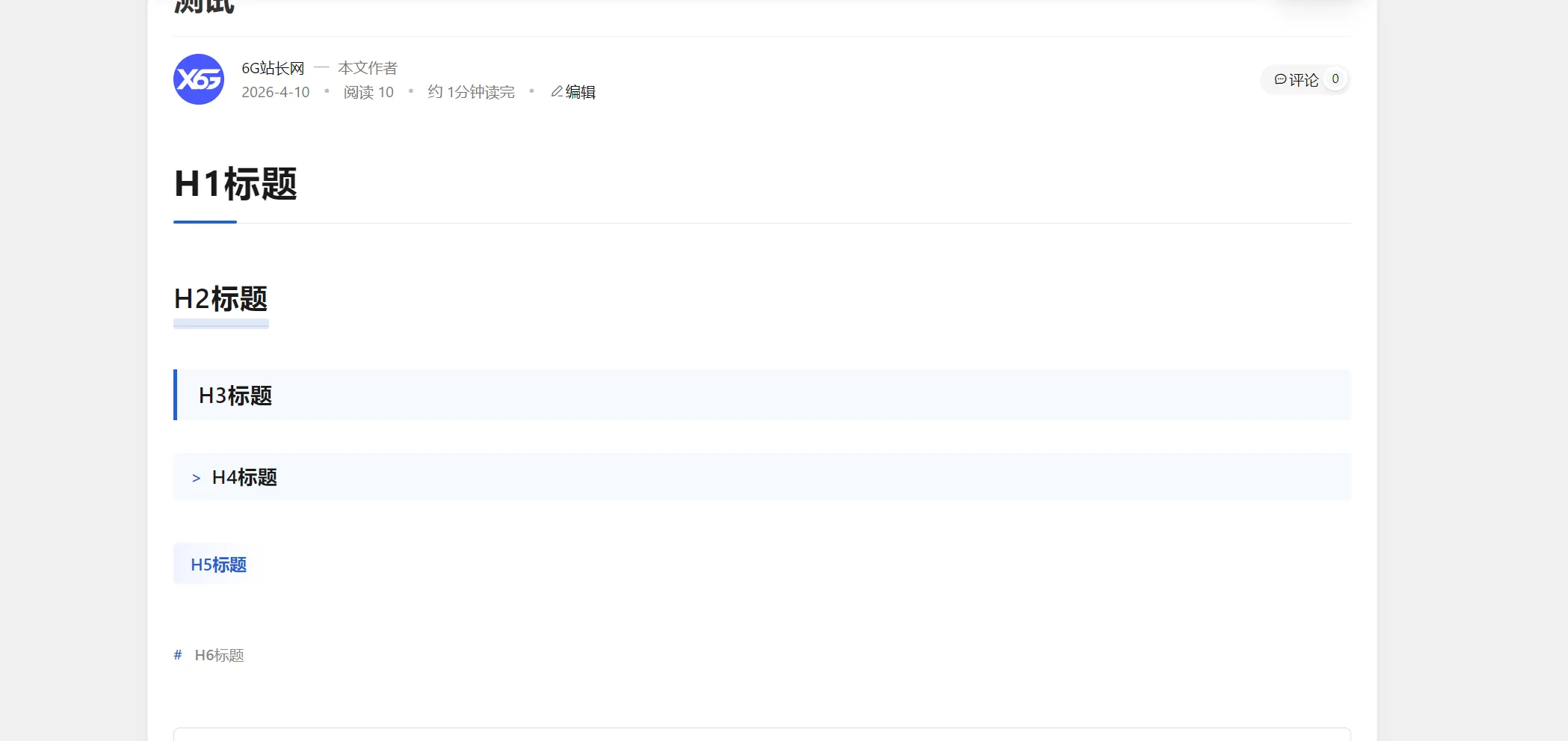
以下代码采用CSS3编写,兼容主流浏览器(Chrome、Edge、Firefox等),支持响应式适配,可根据自身网站色调、字体需求,修改颜色值、字体大小、间距等参数,无需复杂修改,新手友好。
核心美化代码(复制到网站CSS文件即可)
代码
[lv]
.article-content h1 {
    font-size: 34px;
    font-weight: 700;
    color: #1a1a1a;
    margin: 40px 0 25px;
    padding-bottom: 15px;
    border-bottom: 1px solid #e8e8e8;
    position: relative;
}

.article-content h1::after {
    content: '';
    position: absolute;
    bottom: -1px;
    left: 0;
    width: 60px;
    height: 3px;
    background: #0066cc;
    border-radius: 2px;
}

.article-content h2 {
    font-size: 26px;
    font-weight: 600;
    color: #1a1a1a;
    margin: 35px 0 18px;
    position: relative;
    display: inline-block;
}

.article-content h2::after {
    content: '';
    position: absolute;
    bottom: -4px;
    left: 0;
    width: 100%;
    height: 10px;
    background: rgba(0, 102, 204, 0.15);
    border-radius: 2px;
}

.article-content h3 {
    font-size: 20px;
    font-weight: 600;
    color: #1a1a1a;
    margin: 28px 0 15px;
    padding: 10px 16px 10px 20px;
    background: #f5f9ff;
    border-left: 4px solid #0066cc;
    border-radius: 0 4px 4px 0;
}

.article-content h4 {
    font-size: 18px;
    font-weight: 600;
    color: #1a1a1a;
    margin: 24px 0 14px;
    padding: 10px 16px 10px 36px;
    background: #f5f9ff;
    border-radius: 4px;
    position: relative;
}

.article-content h4::before {
    content: '>';
    position: absolute;
    left: 16px;
    top: 50%;
    transform: translateY(-50%);
    font-size: 16px;
    font-weight: 600;
    color: #0066cc;
}

.article-content h5 {
    font-size: 16px;
    font-weight: 600;
    color: #0066cc;
    margin: 20px 0 12px;
    padding: 8px 16px;
    background: linear-gradient(90deg, #f0f5ff, transparent);
    border-radius: 4px;
    display: inline-block;
}

.article-content h6 {
    font-size: 14px;
    font-weight: 500;
    color: #888;
    margin: 18px 0 10px;
    padding-left: 20px;
    position: relative;
}

.article-content h6::before {
    content: '#';
    position: absolute;
    left: 0;
    color: #0066cc;
    font-weight: 600;
}
[/lv]

全部评论
(0)还没有评论,来做第一个留言的人吧
发表评论
邮箱不会被公开